Power Platform Subnet Delegation Security Risks You Must Know
As of December 9th, 2025, one year has passed since I submitted a case (VULN-143251) to the Microsoft Security Response Center regarding security gap in the Power Automate Connector architecture in Power Platform when it comes to the subnet delegation feature.
What is Power Platform Subnet Delegation?
The subnet delegation feature allows you to configure specific subnets from your Azure virtual network to Power Platform so that components such as Dataverse plugins, custom connectors, and several Microsoft connectors for Azure Services can be allocated into those subnets. This is essentially outbound VNET integration that enables Power Platform to integrate with internal resources that are not accessible from the public network. So far, so good.
Microsoft’s documentation provides a diagram to illustrate this concept.
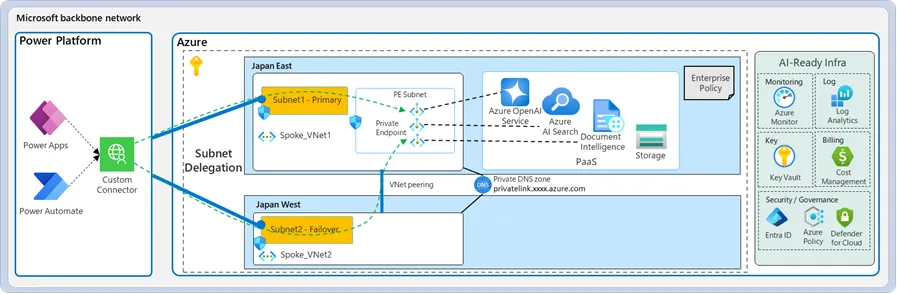 Figure 1. Microsoft’s official subnet delegation documentation diagram
The Security Gap in Microsoft’s Documentation
The problem is that this diagram is oversimplified. The connector architecture utilizes Microsoft Azure API Management resources that are public (accessible from the Internet) not Power Platform as depicted above! Every connector instance has specific endpoint exposed there. So what does this mean? It means that if you configure subnet delegation and start using connectors such as SQL to access internal database or custom connectors to access internal APIs, you are essentially exposing internal resources (SQL database, Web API) to the public network. If an internal attack vector compromises the access token of a user who has access to such an environment (such as an Administrator or end user), an attacker can access your internal resources even though you have configured Firewall for Power Platform! Surprise! This is because the Power Platform firewall only protects Dataverse itself. While it’s true that any compromised credential poses a risk, the documentation fails to clearly communicate that configuring subnet delegation fundamentally changes the attack surface by exposing internal resources through public-facing API Management endpoints when using Power Apps/Power Automate connectors.
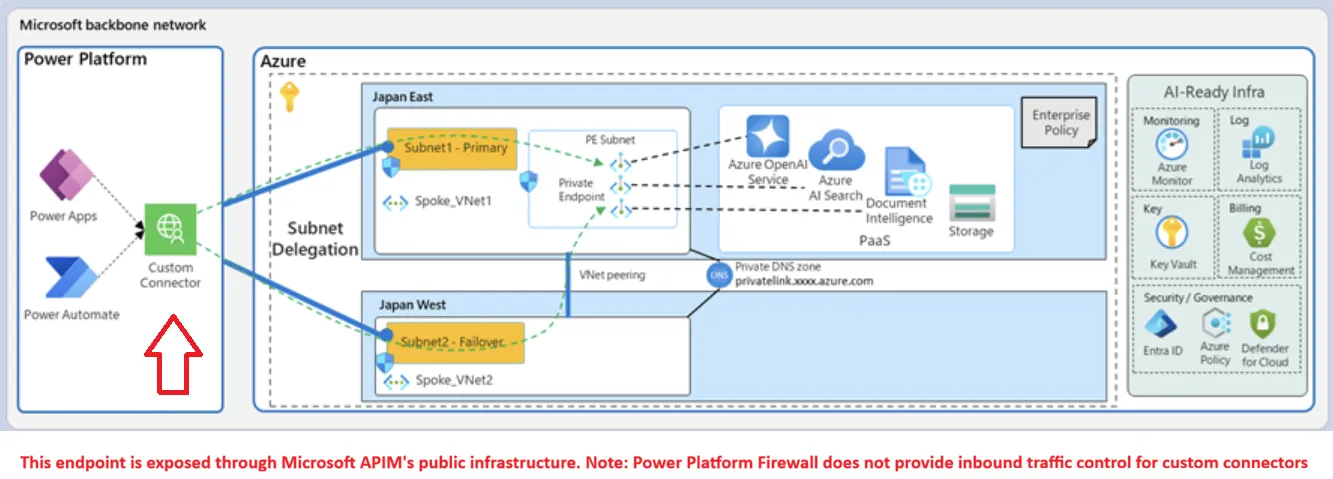 Figure 2. The actual architecture revealing public-facing API Management endpoints
Real-World Example: Exposing Internal APIs
Example:
In a very minimal setup to reproduce it, we need:
-
A Managed Power Platform Environment with subnet delegation configured and a Firewall whitelisting only IP addresses from the corporate network.
-
A Function app that is available only from a virtual network (Premium plan has full fledge vnet integration, in flex plan we can allow traffic only from subnet-powerplatform via service endpoints. The Function app exposes an endpoint, e.g.,
/api/WhoAmI- Network topology in this example is very simplified. Two virtual networks are peered. In both VNETs we have subnet-powerplatform that is delegated to the Power Platform environment. In VNET region A we have an additional subnet-functions to control outbound traffic from the function app. The Function app allows traffic only from subnet-powerplatform.
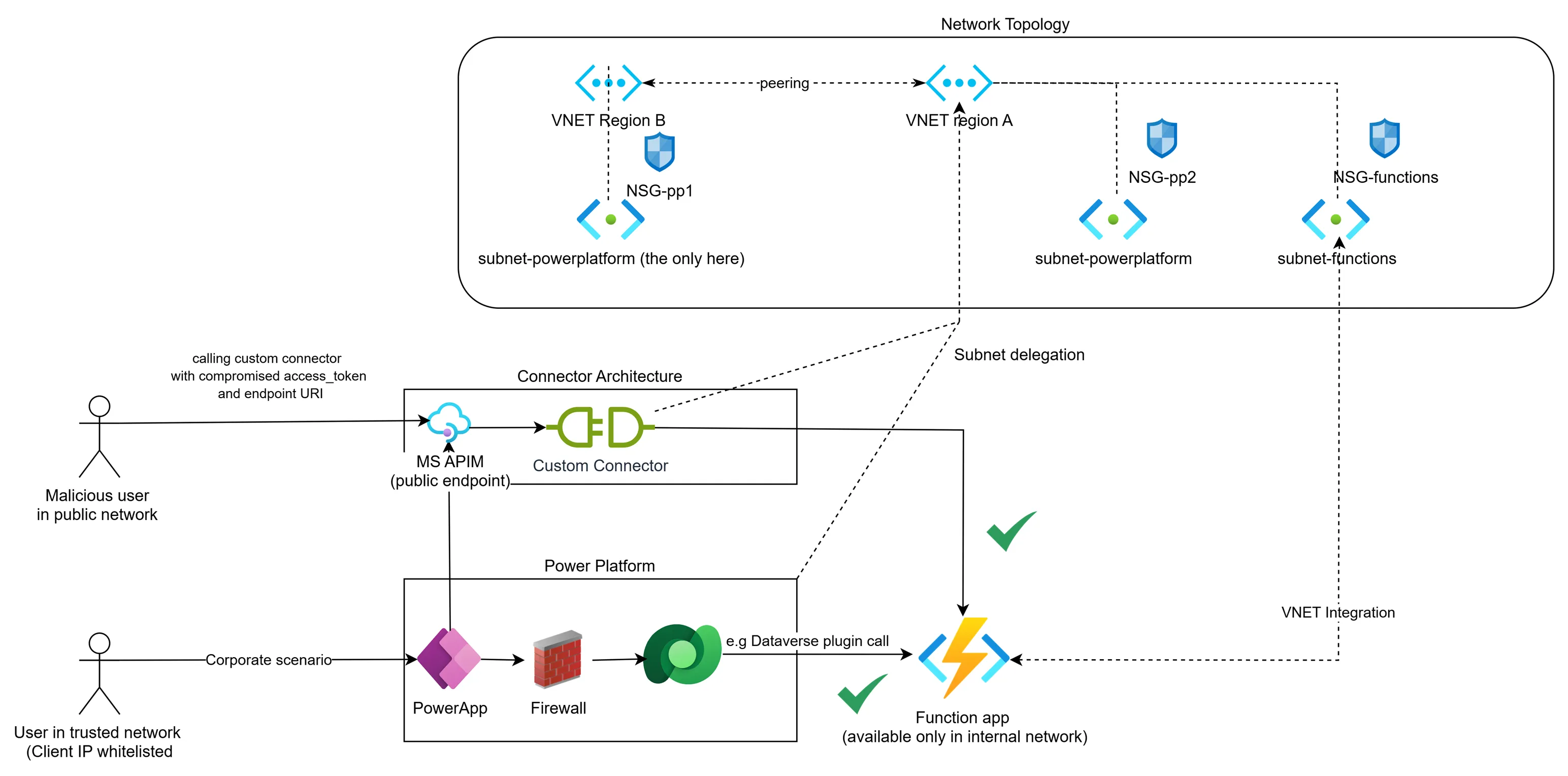 Figure 3. Example network topology demonstrating the security vulnerability when user credentials are compromised
Understanding the Attack Vector
In the diagram above, we can see two users. One is a legitimate corporate end-user of PowerApps who uses both a custom connector and a plugin to integrate with the function app. All inbound calls requiring Dataverse go through the Power Platform Firewall; however, calls to the custom connector go directly to the public MS APIM endpoint.
The custom connector URI for the function app WhoAmI endpoint is
https://<ENVIRONMENTID>.custom.europe002.azure-apihub.net/apim/<CUSTOM_CONNECTOR_NAME>-<SOME_ID1/><SOME_ID2>/WhoAmI (you can inspect this in the network tab in your browser when using PowerApp or testing the connector). This endpoint is available from the public network. With subnet delegation in place, when calling this endpoint, you are calling an internal API hosted in the function app.
Imagine the access_token of the end user is compromised, as well as the custom connector URI. The Dynamics 365 Power Pane extension represents a real-world example of how browser extensions can serve as attack vectors to compromise user sessions, access tokens, and sensitive business data. This incident affected approximately 70,000 users with privileged access to Microsoft Power Platform and Dynamics 365 environments, demonstrating the significant security risks posed by seemingly legitimate browser extensions. Once user session is compromised a malicious user can call your internal API without being in the trusted/whitelisted network IP ranges.
Microsoft’s Response and Recommendations
I received a response from MSRC stating that the current security measures are sufficient and that we should consider using only Dataverse Plugins to eliminate security risks. This is their real advice for those working in regulated environments. However, this approach has trade-offs: while plugins may offer better security controls, they lack the flexibility of custom connectors for implementing e.g., OAuth On-Behalf-Of flow. This means some valid integration scenarios remain unaddressed.
Final Thoughts
One year later, this issue remains unfixed. It’s particularly puzzling that for Power Platform itself, we can configure IP firewall restrictions (apparently Microsoft Entra authentication and licensing controls aren’t sufficient), yet for custom connectors, which often call external APIs, no such IP-based restrictions are available or deemed necessary.
I would expect Microsoft’s APIM infrastructure to be somehow synchronized with the Power Platform Firewall. If this is not possible, the subnet delegation feature should be divided into separate options for connectors and Dataverse plugins, giving administrators granular control over this.
What do you think about this? Maybe I’m making too big a deal out of it.